How do you photograph a sunset with an iPhone?
Tap the bright sky beside the Sun, drag the exposure slider down until the colour returns, keep the horizon level, and stay after the Sun disappears, when the clouds often light up. The rest is knowing where and when the Sun will set, which is a planning problem, not a camera one.
- Expose for the sky. Touch and hold to lock focus and exposure, then slide the sun icon down.
- Pick the lens on purpose. Wide for colour, telephoto for a big Sun.
- Put something in front. A pier, a tree or a person turns a sky into a photo.
- Stay late. Afterglow and blue hour come after the moment everyone leaves.
How big will the Sun be? Pick an iPhone lens
The Sun spans about half a degree of sky. Here is roughly how much of a 4:3 iPhone photo it fills on each lens. Lenses are approximate 35 mm equivalents; which ones you have depends on your model.
On the 1× lens the Sun is a speck. On 5× it is a subject.
Your first week: seven evenings, one skill each
An annotated tour. Each evening adds one thing; screenshots are from Asterfold's App Store listing.
- Evening 1
Check tonight before you go
Open Tonight: sunset time, a Sunset rating with plain-English reasons, and hour-by-hour low, mid and high cloud from MET Norway. A rating is a rule-of-thumb estimate, not a promise.
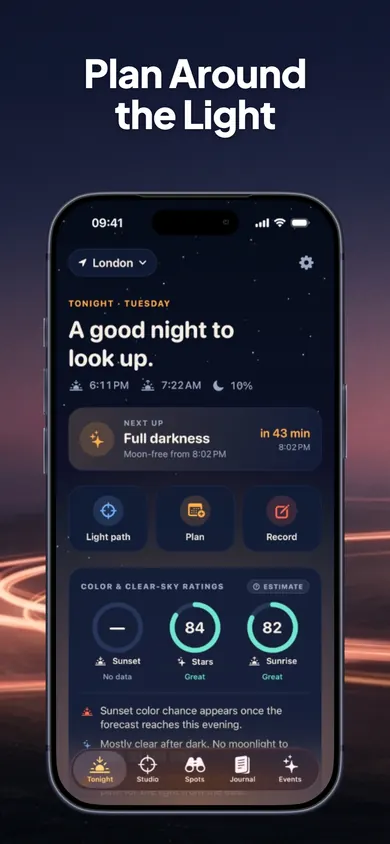 123
1 tonight's headline 2 sunset time 3 ratings, labelled as estimates - Evening 2
Expose for the sky
Leave the app; this one is all camera. Tap the sky beside the Sun, touch and hold to lock, drag the slider down. Take one at auto and one dragged down, and compare them at home.
- Evening 3
Learn where the Sun goes
Light Path Studio draws the Sun's real path on a sky dome for any place and date, coloured by golden hour, blue hour and twilight. Scrub through the day for altitude, bearing and shadow length. It works offline.
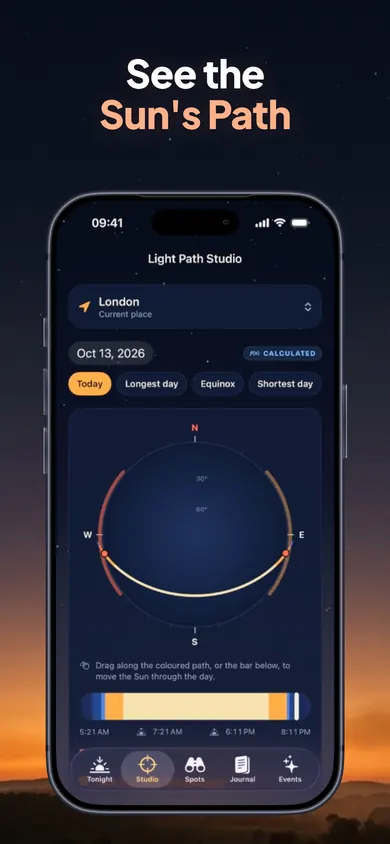 123
1 date and key-date shortcuts 2 the Sun's path 3 scrub the day - Evening 4
Aim, then choose a lens
Save the spot you shoot from, turn toward the shot on a first-person horizon, and pick a lens from 14 to 200 mm or your phone's camera. The frame widens or narrows to match, and shows the dates the Sun sets inside it.
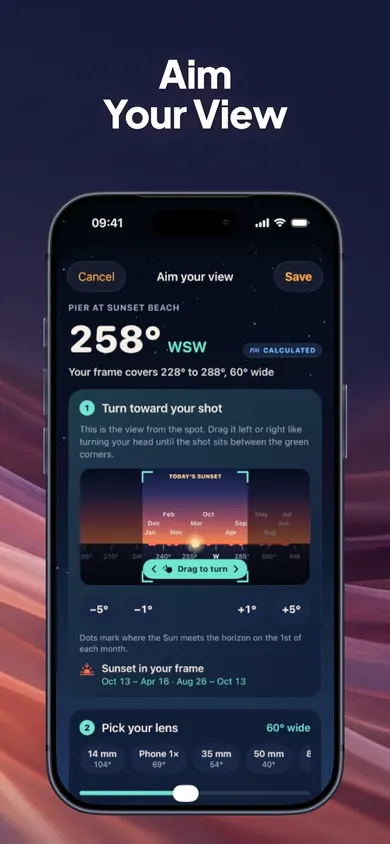 123
1 bearing of your shot 2 drag to turn 3 lens picker - Evening 5
Make a silhouette
Put something between you and the Sun. Expose for the sky as on evening 2, and let the subject go black. A pier, a fence, a friend in profile.
- Evening 6
Stay for afterglow and blue hour
Plan the session for blue hour instead of sunset. Wedge your iPhone against something steady; in low light it may switch to Night mode and ask you to hold still.
- Evening 7
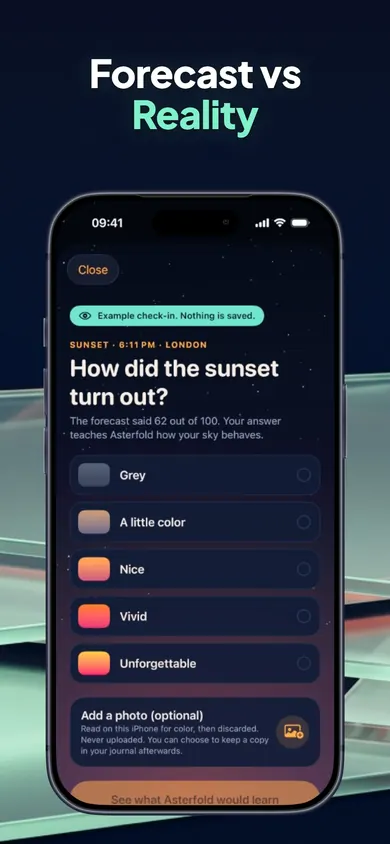
Log what the sky really did
Rate the sunset in two taps, add colours and clouds. Each check-in is compared with the forecast saved before the sunset. After three, the ratings adjust to your own sky in small, capped steps.
 12
1 forecast saved before sunset 2 two-tap rating
Honest limits
- Asterfold does not take or edit photos. It plans and records; your iPhone camera does the shooting.
- Sun positions assume a flat horizon. Hills, buildings and trees are not modelled, so a sunset behind a ridge comes early.
- Free covers the Studio, aiming and plans for 2 viewpoints, the journal, tonight's ratings and the next 3 evenings. Asterfold Plus (yearly with a 7-day free trial for eligible new subscribers, monthly or lifetime) adds unlimited viewpoints, smart sky alerts and the 10-day outlook.
- The lens tool above is geometry, not a lab test: phone processing and cropping change real results.
Who should pick something else: if you shoot on a full camera and want deep ephemeris tools for the Moon and Milky Way too, a pro planner fits better. If you only want tonight's sunset time, your iPhone's Weather app shows it.
iPhone sunset questions
Why do my iPhone sunset photos look washed out?
The camera exposes for the whole scene, and the darker foreground pulls the exposure up until the sky turns pale. Tap the bright sky beside the Sun, then drag the sun-shaped exposure slider down until the colour comes back.
Should I tap on the Sun to focus?
Tap the bright sky next to it rather than the disc itself. Touch and hold to lock focus and exposure, so the camera stops readjusting as you recompose.
Which iPhone lens is best for sunsets?
Use 0.5× or 1× for big skies and colour across the clouds, and 3× or 5× (on models that have them) to make the Sun itself bigger behind a subject. The lens tool on this page shows the difference.
Is it better before or after sunset?
Both, for different reasons. Before: a visible Sun, warm light, long shadows. After: the clouds can light up and the sky turns pink, then blue. Plan to stay at least through the first part of civil twilight.
Do I need a tripod?
Not for golden hour. After sunset, as light drops, a small tripod or a steady surface helps, especially if your iPhone switches to Night mode and asks you to hold still.
Can Asterfold take the photo for me?
No. Asterfold is a planner: it shows where and when the Sun will set, rates tonight's sky as an estimate, and keeps a journal of what you saw. You take the photo with your iPhone camera.
A mini story: evening four, the 3× lens
You have shot three sunsets at 1× and the Sun is a white dot every time. On evening four you save the end of the pier as a viewpoint, check that the Sun sets inside your frame this week, and switch to 3×. You tap the sky beside the Sun, drag down, and wait. The posts of the pier go black, the Sun sits between them like it was placed there, and for once the photo looks like what you saw. Afterwards you rate it “vivid” and add a note: low cloud, came back for blue hour.
The best camera upgrade for sunsets is knowing where to stand.
Plan evening one tonight.
Tonight's sunset, the Sun's bearing and a rating with reasons, free on iPhone.

Updated November 2026
Related
- Asterfold: golden hour and sunset plannerSee where the Sun sets from your own viewpoint, when golden and blue hour start, and how the sky really turned out. Free on iPhone.
- Earliest sunset of the year: find your city's dateThe earliest sunset comes before the winter solstice. Pick your city to see the 2026 date and time, the latest sunrise, and when evenings get longer.
- What time to book a golden hour photo sessionPick a city and date to get an estimated start time for golden hour photos: when to arrive, first frame, sunset and blue-hour wrap.
- How long does blue hour last? Myths vs factsBlue hour lasts about 15 to 40 minutes in most places, not an hour. Six myths vs facts, plus a slider that estimates it for your city and date.