What is a golden hour app, and why use one?
A golden hour app tells you when the Sun will be low enough for warm, soft light and where it will set, so you are standing in the right place, pointed the right way, before it happens.
Asterfold does that for the places you actually watch from. A sky dome draws the Sun’s real path for any place and date, coloured by golden hour, blue hour and twilight. Scrub through the day for the Sun’s altitude, bearing and shadow length. It is calculated on your iPhone, so it works offline.
Golden hour vs blue hour, by Sun angle
Photographers usually define the light by how high the Sun is, not by the clock, because the clock times change with season and latitude. These are common working ranges; sources differ by a degree or two.
| Light | Sun altitude | What it looks like |
|---|---|---|
| Daylight | above about 6° | Brighter, harder light, shorter shadows |
| Golden hour | about 6° to −4° | Warm, low light and long shadows |
| Sunset | about −0.8° | The Sun’s top edge leaves a flat horizon |
| Blue hour | about −4° to −6° | Deep blue sky, city lights glow |
| Nautical twilight | −6° to −12° | Fading to dark, first stars |
Asterfold shows these windows for your exact place and date, so you don’t have to work them out.
Plan an evening in four steps
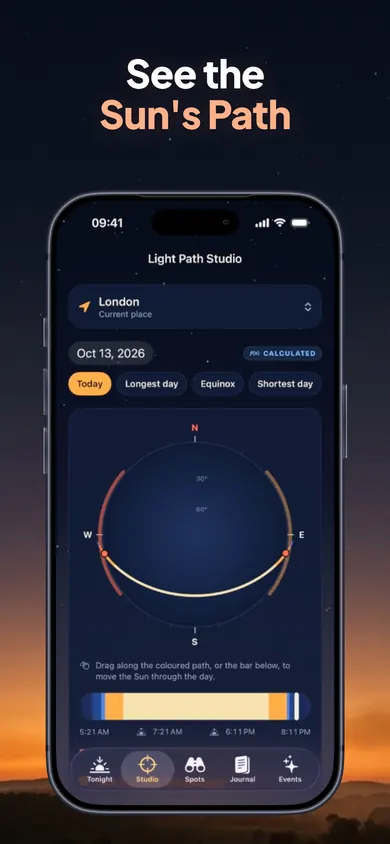
1. See the Sun’s path. Scrub through the day; jump to the longest day, equinox or shortest day. 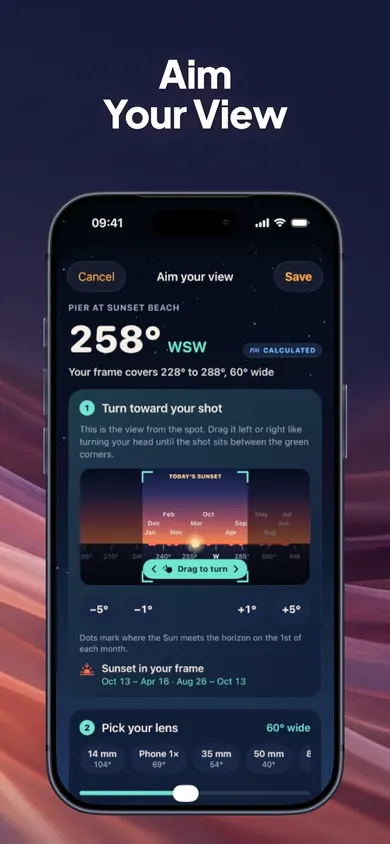
2. Aim your view. Turn toward your shot on a first-person horizon and see the dates the Sun sets inside your frame. 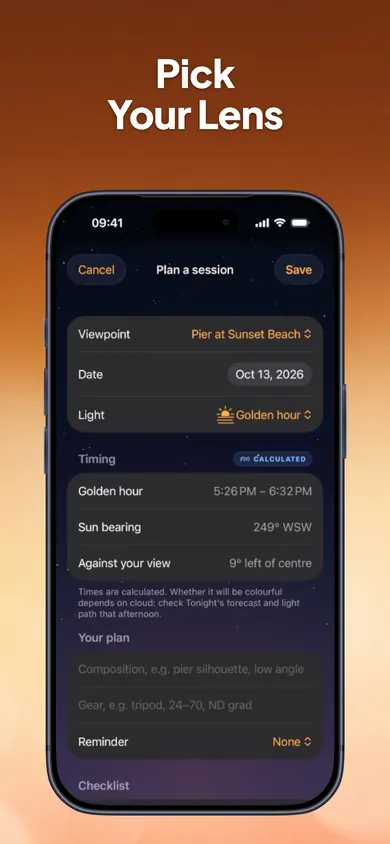
3. Plan the session. Pick golden hour, sunset or blue hour; add gear, notes, a reminder and a checklist. 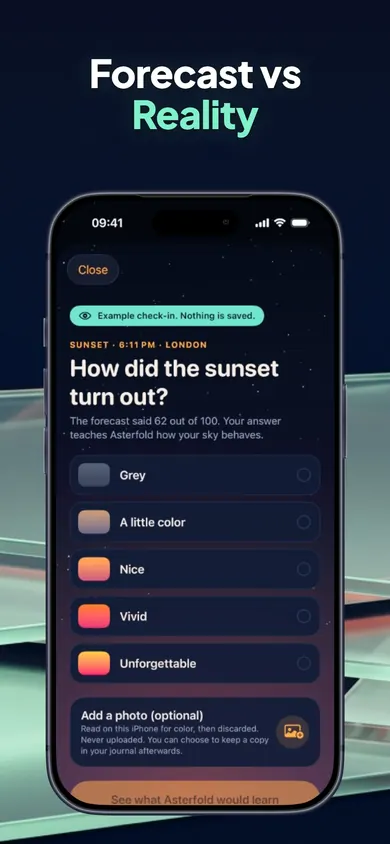
4. Record what happened. Rate it in two taps; it is compared with the forecast saved before sunset.
Sunset forecast, labelled honestly
The Tonight screen gives Sunset, Stars and Sunrise ratings with plain-English reasons, hour-by-hour low, mid and high cloud from MET Norway, and for tonight, point forecasts 60 km and 180 km toward the setting Sun, where low cloud can cut off the light.
Calculated, forecast, estimated and observed data are labelled differently, and ratings are a rule-of-thumb estimate, not a probability. After three check-ins, your colour ratings adjust to your own sky in small, capped steps.
One decision we made
Each check-in is compared with the forecast Asterfold saved before the sunset, never a later one. A later forecast would always look smarter than it was. Over a season you see how well the forecast fits your spot.
Golden hour and Asterfold questions
What is the best app to plan golden hour photos?
If you shoot from the same few places, Asterfold is built for that: it draws the Sun’s real path for any place and date, lets you aim your saved viewpoint with your lens, and keeps a journal of how each sunset actually looked. Other planners cover more map tools; Asterfold focuses on your spots.
What is the difference between golden hour and blue hour?
Golden hour is when the Sun is low, roughly from about 6° above the horizon to a few degrees below it, so light is warm and shadows are long. Blue hour follows, with the Sun roughly 4° to 6° below the horizon, when the sky turns deep blue. Exact cut-offs vary between sources.
Does Asterfold work offline?
The Light Path Studio is calculated on your iPhone, so Sun positions work offline. Tonight’s cloud forecast comes from MET Norway and needs a connection.
Is Asterfold free?
Free includes the Studio, aiming and plans for 2 viewpoints, the journal, check-ins and tuning, tonight’s ratings, the next 3 evenings and 45 days of events. Asterfold Plus adds unlimited viewpoints, smart sky alerts, the full 10-day outlook and a year of sky events, as Yearly (7-day free trial for eligible new subscribers), Monthly or a one-time Lifetime purchase.
Can Asterfold predict a colourful sunset?
It gives Sunset, Stars and Sunrise ratings with plain-English reasons, based on low, mid and high cloud, including forecasts 60 km and 180 km toward the setting Sun. The ratings are a rule-of-thumb estimate, not a probability or a guarantee.
Does it account for hills and buildings?
No. Sun positions assume a flat horizon; hills, buildings and trees are not modelled. If your view has a ridge to the west, the Sun will drop behind it earlier than the listed sunset.
What data leaves my phone?
No account and no analytics. Viewpoints, journal entries and photos stay on your iPhone. Only a position rounded to about 1 km is sent to MET Norway for the forecast.
Catch tonight’s sunset
Save your spot, aim your lens and catch the light when it comes. Free on iPhone.

Updated November 2026
More golden hour guides
- Earliest sunset of the year: find your city's dateThe earliest sunset comes before the winter solstice. Pick your city to see the 2026 date and time, the latest sunrise, and when evenings get longer.
- How to find where the sun will set from a window or balconyTap the way a window, balcony or viewpoint faces and see which months it catches the sunset in your city. Estimated with the NOAA solar method.
- What time to book a golden hour photo sessionPick a city and date to get an estimated start time for golden hour photos: when to arrive, first frame, sunset and blue-hour wrap.
- A 14-evening sunset photography challenge with dated timesA 14-evening sunset photography challenge: one prompt a night, a progress ring, and estimated sunset times and directions for your city.
- A 14-evening sunset photography challenge with dated timesA 14-evening sunset photography challenge: one prompt a night, a progress ring, and estimated sunset times and directions for your city.
- What time to book a golden hour photo sessionPick a city and date to get an estimated start time for golden hour photos: when to arrive, first frame, sunset and blue-hour wrap.
- Earliest sunset of the year: find your city's dateThe earliest sunset comes before the winter solstice. Pick your city to see the 2026 date and time, the latest sunrise, and when evenings get longer.
- How to find where the sun will set from a window or balconyTap the way a window, balcony or viewpoint faces and see which months it catches the sunset in your city. Estimated with the NOAA solar method.